Screenshot
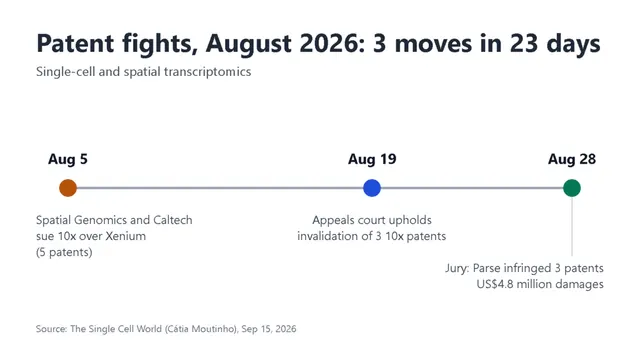
Timeline chart
For newsletter writers on Windows
Clips, screenshots, photos and notes on one board. No tagging. When the issue is due, turn the board into a private Substack draft with your sources listed.
Saving and search work for any newsletter. Private drafts go to Substack and Ghost.
For Windows PCs · No account · Free during the beta · No Mac version yet
Example board · Issue research
Timeline chart
Patent Wars in Single-Cell & Spatial Transcriptomics, August 2026
“A new challenge to Xenium.”
10x Genomics, Parse Headed to Trial After Split Patent Rulings
“10x Genomics has had a mixed week in court.”
Federal Circuit Upholds PTAB Obviousness Rulings Against Single Cell Sequencing Patents
“An obvious combination of prior-art elements.”
Sources to check
Single-cell transcriptomics
Reading gene activity one cell at a time.
Spatial transcriptomics
Measuring gene activity while keeping track of where in the tissue it happens.
5 Things No One Tells You About Spatial Transcriptomics
“Why tissue, not technology, is the real challenge.”
The Missing Semester: Spatial Transcriptomics
A walkthrough of spatial analysis on a small Visium dataset.
10x Genomics
The company behind the Chromium, Visium and Xenium platforms.
Inter partes review
How anyone can ask the patent office to cancel a granted patent.
Explainer box · spatial transcriptomics
Single-cell sequencing tells you which genes are active in each cell, but the cells are taken out of the tissue first, so you lose where they were. Spatial transcriptomics keeps that map: it measures gene activity in a thin slice of tissue and records where each reading came from.
Some methods capture RNA on a slide printed with position barcodes and then sequence it. Others image the RNA inside the tissue under a microscope. Xenium, the platform in the Caltech case, is one of the imaging kind.
As Cátia Moutinho puts it, the hard part is often the tissue, not the technology.
Issue 42 · outline
Open with the three filings. Then what it means for labs buying instruments this year.
Reader questions from issue 41
Three replies to the last issue asked versions of the same things. Answer them in a box after the three cases.
Issue 42 · draft intro
Between August 5 and August 28, three decisions landed in the fight over who owns the tools for reading single cells.
Spatial Genomics and Caltech sued 10x Genomics in Delaware over five patents they say the Xenium platform uses. The Federal Circuit agreed with the patent office that three 10x patents on single-cell barcoding were obvious. Nine days later, a Delaware jury found that Parse had infringed three patents 10x acquired with Scale Biosciences, and awarded US$4.8 million.
If you run a core facility or are about to buy an instrument, none of this changes what works at the bench this week. It may change what you can buy next year, and on what terms.
Essay draft · What the patent fights mean for labs
Cátia Moutinho ends her August roundup with advice I want to build on: stay informed, and ask the company before you buy. It sounds obvious, but most labs I talk to choose a platform on data quality and price and never ask about pending cases.
Her post points to NanoString’s CosMx, now sold by Bruker, as an earlier case where a patent dispute touched what labs could buy. Andrew P. Han at Ion Genomics reported that a judge sent the Scale patents case against Parse to a jury instead of throwing those patents out.
The IPWatchdog summary of the appeal is worth reading slowly. The court found the barcoding claims were an obvious combination of earlier work. That is a narrow legal point, not a verdict on whose chemistry is better.
What I want readers to leave with: a short list of questions for a sales rep, and a clear sense of which rulings are final and which are not.
Interview notes · core facility manager
Call on September 18 with the manager of a university genomics core. Asked not to be named.
They run droplet single-cell and one spatial platform. The choice came down to sample types, the service contract and what their users already knew. Nobody raised patents during the purchase.
Two PIs asked their vendor reps about the lawsuits after August. Both got a general answer and nothing in writing.
The worry is less the instrument than the kits. If a kit line is withdrawn or repriced, a study that is half done has to change chemistry.
Quote to use: “We budget reagents three years ahead. A court case can outlast that.”
Subject line drafts
Subject lines to test for issue 42. Pick one by Thursday.
Practical titles did better than clever ones last time, so the second is the favourite.
The Right Way To Write With AI
Outline first, then let the draft come.
Style notes for this newsletter
Name the product, not only the company. Readers buy Xenium or Evercode, not “10x” or “Parse”.
Say which court and what stage. An appeal decision, a jury verdict and a new complaint are three different things, and a reader should never have to guess which one a paragraph is about.
Link the primary source first, then the coverage. One chart per issue, with its source printed on it. No predictions about who will win.
So you want to write about science…
“Science communication is, at its core, a public service.”
The real app
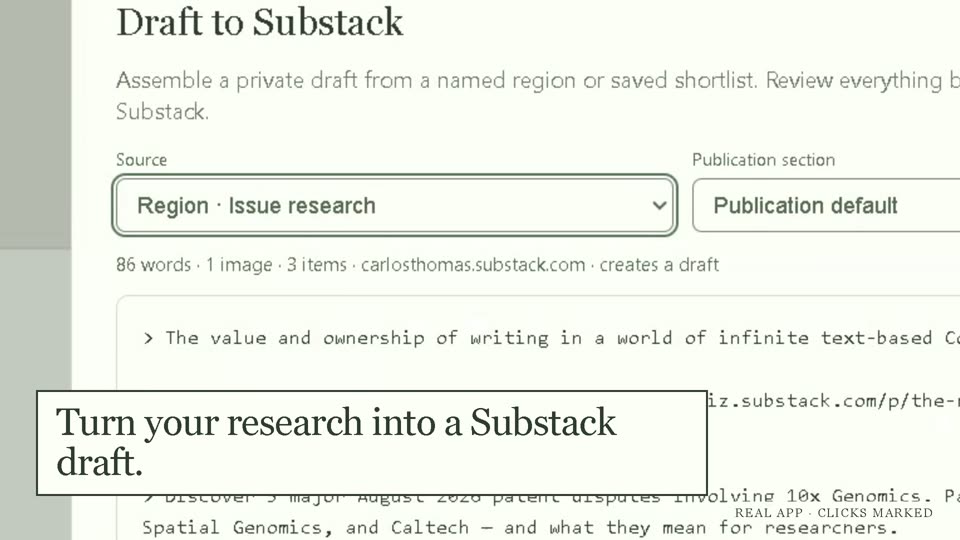
Above is an example board drawn on this page. Here is Field Notes itself: search "23 days" and the chart comes up, labelled "Text in image", because those words are only inside the screenshot. Then a group of notes becomes a Substack draft to review.
The words in a screenshot are read by Windows' own text recognition, so your PC needs the Windows OCR language pack for your language. Search by meaning and by what a picture shows needs a one-time model download that you start.
It's Thursday. You have 30 tabs open, screenshots on the desktop, quotes in a notes app. The chart you need is somewhere.
Without it, you rebuild your research from memory every week.
With Field Notes, each week starts from what you saved, not from a blank page.
"The problem was never capturing them, it's that nothing ever resurfaces them again once they're saved."
Type a few words from a screenshot and it comes up. Search also finds notes by what they mean and pictures by what is in them. It all runs on your PC, and you never tag anything.
A web clip keeps the author, the date and, when the site allows it, a full copy of the page, so the source can still open later.
Turn one part of the board into a private Substack or Ghost draft. The sources are listed at the bottom. Field Notes never publishes the post for you. You finish it and publish it yourself.
Readwise and Raindrop keep your highlights and saved links. Field Notes keeps the rest of the research for a post: screenshots, charts, images, clips and notes, together on one board.
Search reads what each item says, including words inside a screenshot. Save the article in your read-later app, and put the parts you need for this week's post on the board.
Paste links and drop in screenshots.
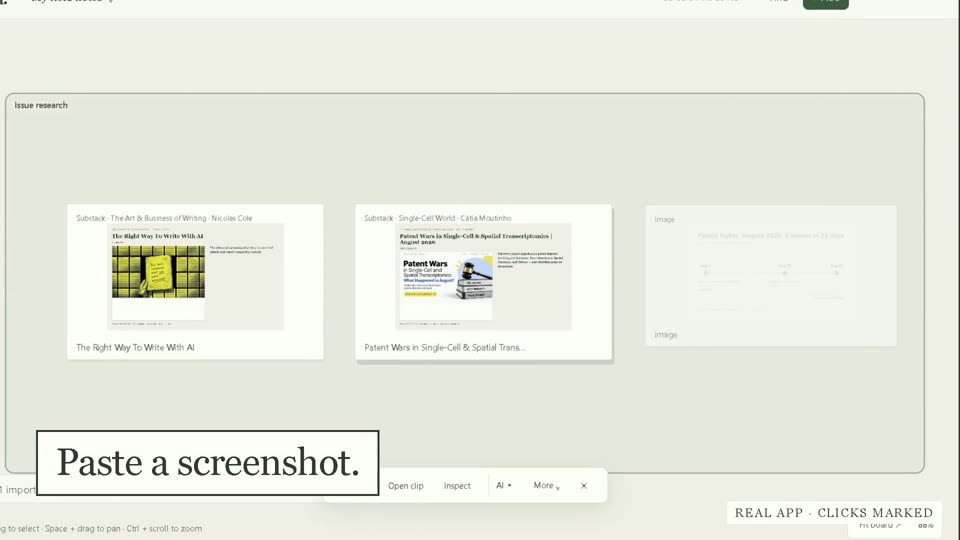
Drag this week's links into one corner of the board. Type a word from a screenshot, and the screenshot comes up.
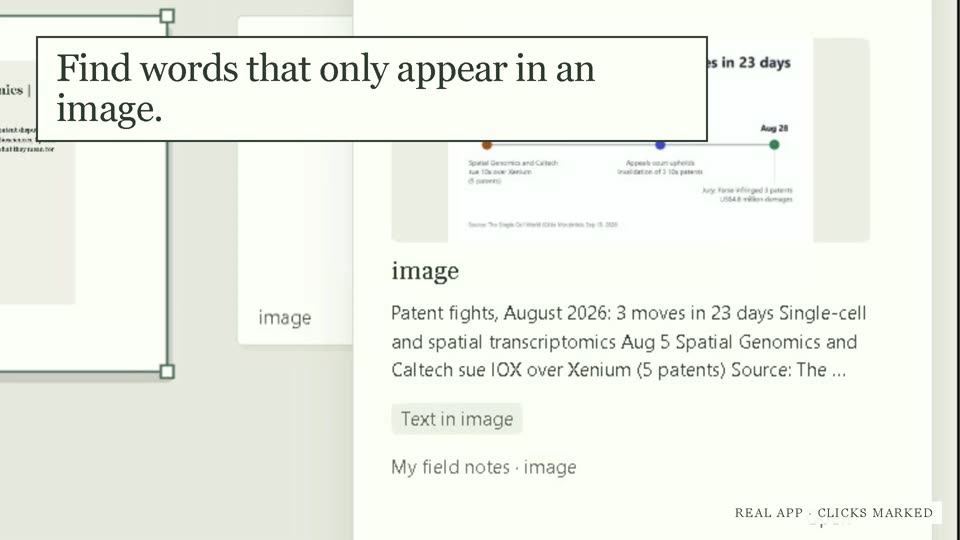
Send a group of notes to a private Substack draft with the sources listed. You review it and publish it yourself.
Any web page can be saved.
With music · captions in the picture
Example
Monday you paste a Substack post about rent prices. Tuesday you screenshot a chart. Wednesday, three more links. Thursday night you open the board, type "rent", and it's all there, with who wrote each piece. You pick five cards and send them to a Substack draft. The sources are already listed at the bottom.
No. Field Notes never publishes, schedules or emails the post. It makes a private draft, and you finish it in Substack or Ghost.
No. Substack has no public API for this, so Field Notes uses your own Substack sign-in. Drafts also work with Ghost on the Publisher plan or higher.
There is no phone app. A phone can send things to a folder Field Notes watches (Quick Share, Phone Link or a cloud drive), and your Substack Saved list can come in too.
AI is off until you turn it on. Changes from AI tools wait for your OK by default. You can choose to let them apply for a set time; Substack drafts, clips and deletes always wait.
Field Notes holds the research and the shape of the piece, and the draft lands in Substack or Ghost. Every note is also saved as a Markdown file, and you can export a board as a file.
Your boards live in a folder on your PC, and export keeps working even after beta access ends.
It is a Windows app for PCs with an Intel or AMD processor, measured on Windows 11 laptops with Intel graphics. Windows 10 has not been tested. The installer is about 345 MB.
There is no account and no tracking. Update checks send the app name, version and processor type, never your content. Search runs on your PC.
It is free during the invite-only beta. After launch the plan is a one-time purchase. No price is set yet.
Field Notes keeps everything you save for your newsletter on one board and finds it by what it says, so each post starts from research you already have.
A few questions about your PC, so we invite the people it will run well for. Beta news about every two weeks. Unsubscribe in one click.